


UPGRADE DURATION
Upgrading the system to version 10.2608 may, in some cases, take 1–2 hours. We therefore recommend performing the upgrade at a time when the impact on users is minimal.
WARNING!
Before upgrading the program to Codeks 10.2608.4.31914, all users running versions older than 10.2404.12 are REQUIRED to first upgrade to the special transitional version 10.2404.12.23746!
More information at the LINK.
Older versions
Codeks AC 10. 2603. 0. 29972
09.06.2026, 111 MB
UPGRADE DURATION
Upgrading the system to version 10.2603 may, in some cases, take 1–2 hours.
WARNING!
Before upgrading the program to Codeks 10.2603.0.29972, all users running versions older than 10.2404.12 are REQUIRED to first upgrade to the special transitional version 10.2404.12.23746!
More information at the LINK.
Codeks AC 10. 2601. 7. 28680
16.04.2026, 70 MB
UPGRADE DURATION
Upgrading the system to version 10.2601 may, in some cases, take 1–2 hours.
WARNING!
Before upgrading the program to Codeks 10.2601.7.28680, all users running versions older than 10.2404.12 are REQUIRED to first upgrade to the special transitional version 10.2404.12.23746!
More information at the LINK.
UPGRADE DURATION
Upgrading the system to version 10.2512 may, in some cases, take 1–2 hours.
WARNING!
Before upgrading the program to Codeks 10.2512.3.27411, all users running versions older than 10.2404.12 are REQUIRED to first upgrade to the special transitional version 10.2404.12.23746!
More information at the LINK.
UPGRADE DURATION
Upgrading the system to version 10.2507 may, in some cases, take 1–2 hours.
WARNING!
Before upgrading the program to Codeks 10.2507.1.27436, all users running versions older than 10.2404.12 are REQUIRED to first upgrade to the special transitional version 10.2404.12.23746!
More information at the LINK.
WARNING!
Before upgrading the program to Codeks 10.2501.12.24444, all users with older versions are REQUIRED to first upgrade their program to the special transitional version 10.2404.12.23746!
All users who already have version 10.2404.12.23746 or newer (10.2501.2.xx and above) can upgrade the program normally.
More information at the LINK.
WARNING!
Before upgrading to newer versions, you must first install 10.2404.12.23746!
More information at the LINK.
Can I install the latest version?
You can install a Codeks software version if it was released while your update license was valid.
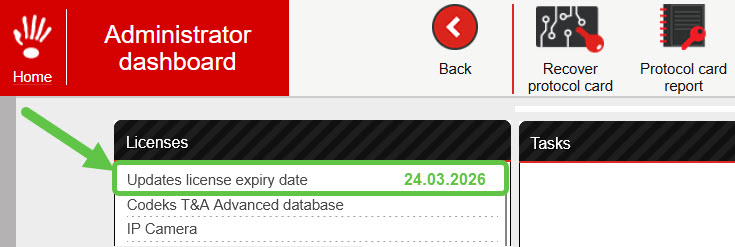
The date until which you are entitled to Codeks software updates is the same as the license expiry date. You can find it in the Codeks application Administrator dashboard.
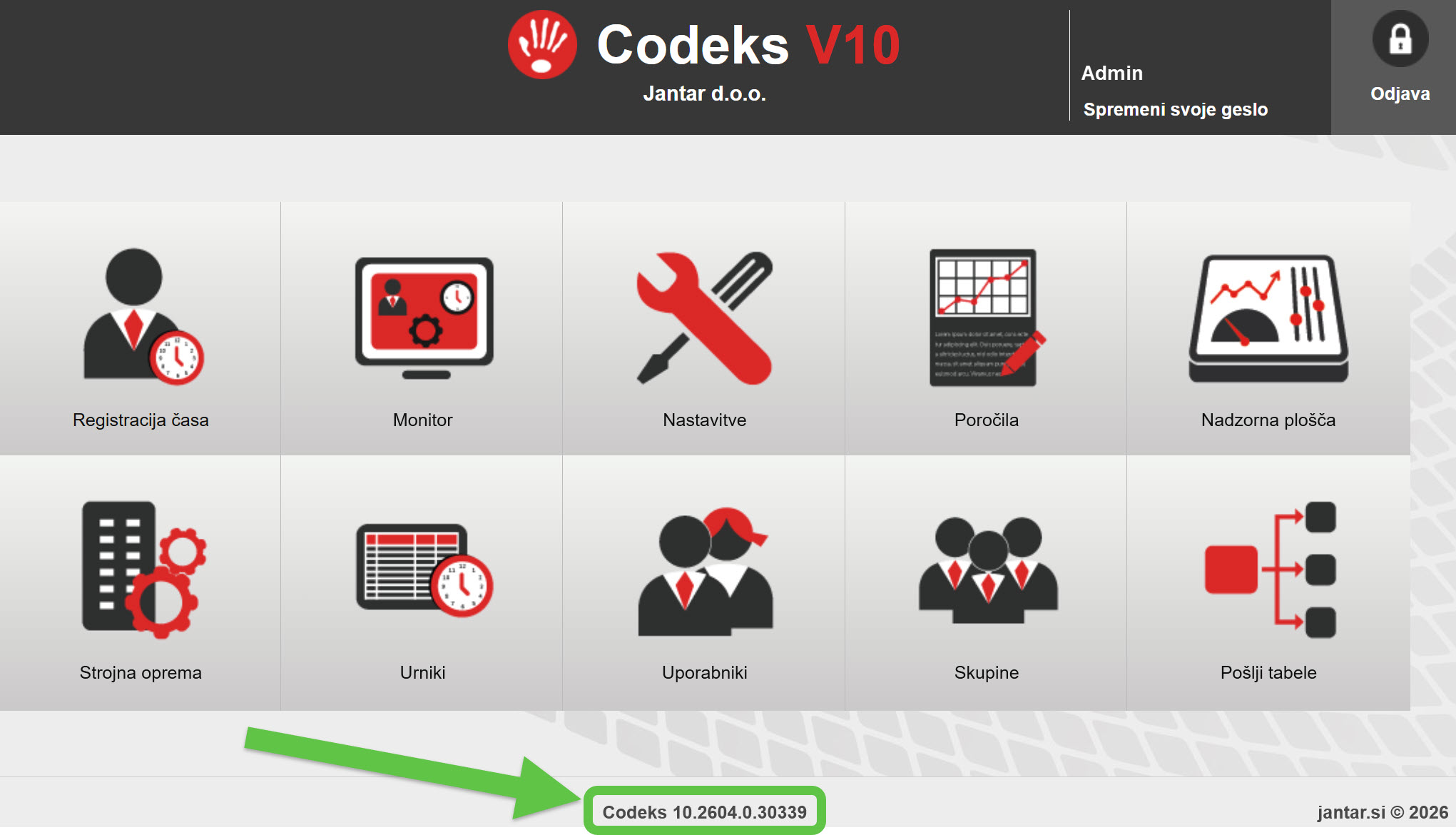
You can find the version number of your currently installed Codeks software at the bottom of the Codeks application start screen.
The names of Codeks software versions include the month and year of release.
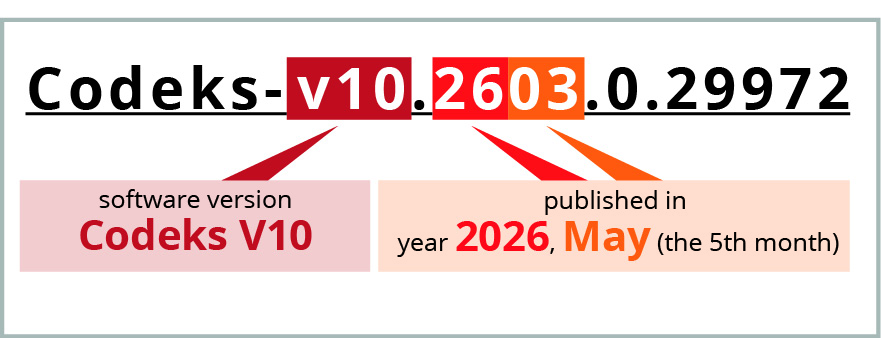
Example:
If your update license is valid until 24/03/2026, you can install versions released up to and including March 2026, meaning versions marked 10.2603 or earlier (v10.2601.x.x, v10.2512.x.x, v10.2507.x.x, and all earlier versions).
However, you cannot install versions 10.2604 or later, as they were released after your update license expired.
If you want to install a newer version, you must first obtain a new update license.
Manuals and documentation
for Codeks AC and compatible Codeks add-ons
 Codeks Manual-en.pdf
Additional / supplementary programs
Codeks Cleaner
Additional tool for cleaning the database and server files
This program already gets installed on your server during the installation of the main Codeks application.
-
“We advise and prepare the best possible offer, which includes solutions for all your needs.”
